A construction project generates a vast amount of information: drawings, plans, contracts, meeting minutes, inspection records, photos, tasks, approvals and handover materials. At the same time, several organisations work on the project with different responsibilities, systems and working practices.
Why do information management mistakes happen?
Mistakes typically occur when there is no shared source of information, practices have not been agreed or the system does not support how the project actually works. Information then becomes scattered across services and personal folders. Traceability weakens and decision-making slows down.
The main goal of information management
To ensure that correct, approved information can be found quickly, its history is known and everyone involved understands how to handle it.
Mistake 1
Project information is scattered across multiple locations
Documents are often stored simultaneously in emails, shared drives, cloud services, Teams channels and personal folders. When the same material exists in several places, nobody can be completely sure which location is official.
What are the consequences?
- Working time is spent searching for the right document.
- Multiple copies of the same file are created.
- Personnel changes create a risk of losing information.
- The overall project picture remains fragmented.
How to prevent it
Define one official source of information for the project and agree what will be stored there. The project bank should be the primary location for documents, drawings, tasks, decisions and other project materials.
Mistake 2
Outdated drawings and document versions remain in use
Using an outdated drawing or instruction is one of the most costly information management mistakes in construction. This is especially likely when files are distributed as email attachments or saved in several folders.
What are the consequences?
- Work is carried out using outdated plans.
- Structures need to be dismantled and rebuilt.
- Schedules slip and costs increase.
- Establishing responsibility becomes harder.
How to prevent it
Use a system where the current version is always clearly identifiable, previous versions remain in the history and the right recipients can be notified automatically of new revisions.
Mistake 3
Document naming conventions and metadata are missing
Files are easily named according to personal habits. Folders then fill with names such as “final”, “new”, “corrected”, “latest” or “final_v2”, which do not reliably describe the document’s content or status.
What are the consequences?
- Search tools cannot find materials efficiently.
- The filename does not explain the document’s content.
- Project participants use different classifications.
- Compiling handover documentation becomes harder.
How to prevent it
Create shared naming guidelines at the start of the project. Use metadata such as document type, design discipline, building element, status, revision and person responsible. This makes information easier to find without relying solely on the folder structure.
Mistake 4
Access permissions are too broad, too restrictive or unclear
Construction projects involve clients, designers, contractors, subcontractors, supervisors and other stakeholders. Not everyone needs access to everything, but everyone must be able to access the materials required for their work.
What are the consequences?
- Confidential information is visible to the wrong people.
- Users cannot access the documents they need.
- Processing access requests slows down work.
- Accounts of users who have left remain active.
How to prevent it
Manage permissions primarily through roles and groups. Define access by project, organisation, folder and function. Review users regularly and remove unnecessary permissions promptly.
Mistake 5
Email is used as the project’s information management system
Email is a useful communication tool, but a poor place to manage official project information. Attachments remain in recipients’ inboxes, message threads break apart and decisions can become accessible only to individual people.
What are the consequences?
- Multiple copies of the same document circulate.
- New project team members cannot see earlier discussions.
- Decisions and distribution become harder to trace.
- Handling large attachments slows down communication.
How to prevent it
Email a link to the document in the project bank instead of an attachment. Recipients then open the same up-to-date version, and the document’s history stays in one place.
Mistake 6
Decisions, approvals and changes are not adequately documented
Decisions are made every day in meetings, phone calls, emails and site rounds. If the decision, reasoning, person responsible and date are not recorded, the information quickly becomes open to interpretation.
What are the consequences?
- The same issue is revisited repeatedly.
- Participants have different understandings of what was agreed.
- The cost and schedule impacts of changes cannot be traced.
- Evidence needed in disputes is missing.
How to prevent it
Record decisions in a structured way and link them to relevant documents, tasks or meeting minutes. Record at least the decision, date, decision-maker, reasoning, person responsible and any deadline.
Mistake 7
Tasks lack a clear owner or deadline
Meeting minutes, inspections and discussions often identify matters that “need to be clarified”. Without a named owner and deadline, a task can be left waiting, or several people may assume someone else is handling it.
What are the consequences?
- Open issues accumulate.
- Work stages start with incomplete information.
- Project managers cannot see the true status.
- Urgent matters get lost among other tasks.
How to prevent it
Turn agreed actions into trackable tasks. Every task should have a person responsible, deadline, status, priority and the necessary attachments. It should be easy to report on open and overdue tasks.
Mistake 8
Site observations and inspections are recorded too late
Information generated on site is most valuable when recorded immediately. If an observation is noted on paper or a personal phone and entered into the system later, details may be forgotten.
What are the consequences?
- The exact location of defects and surrounding conditions remain unclear.
- Photos are not linked to the right task or inspection.
- Corrective actions are delayed.
- Quality documentation remains incomplete.
How to prevent it
Use a mobile-friendly system to record observations, photos, responsibilities and deadlines directly on site. Where needed, link the observation to a drawing, room, building element or inspection.
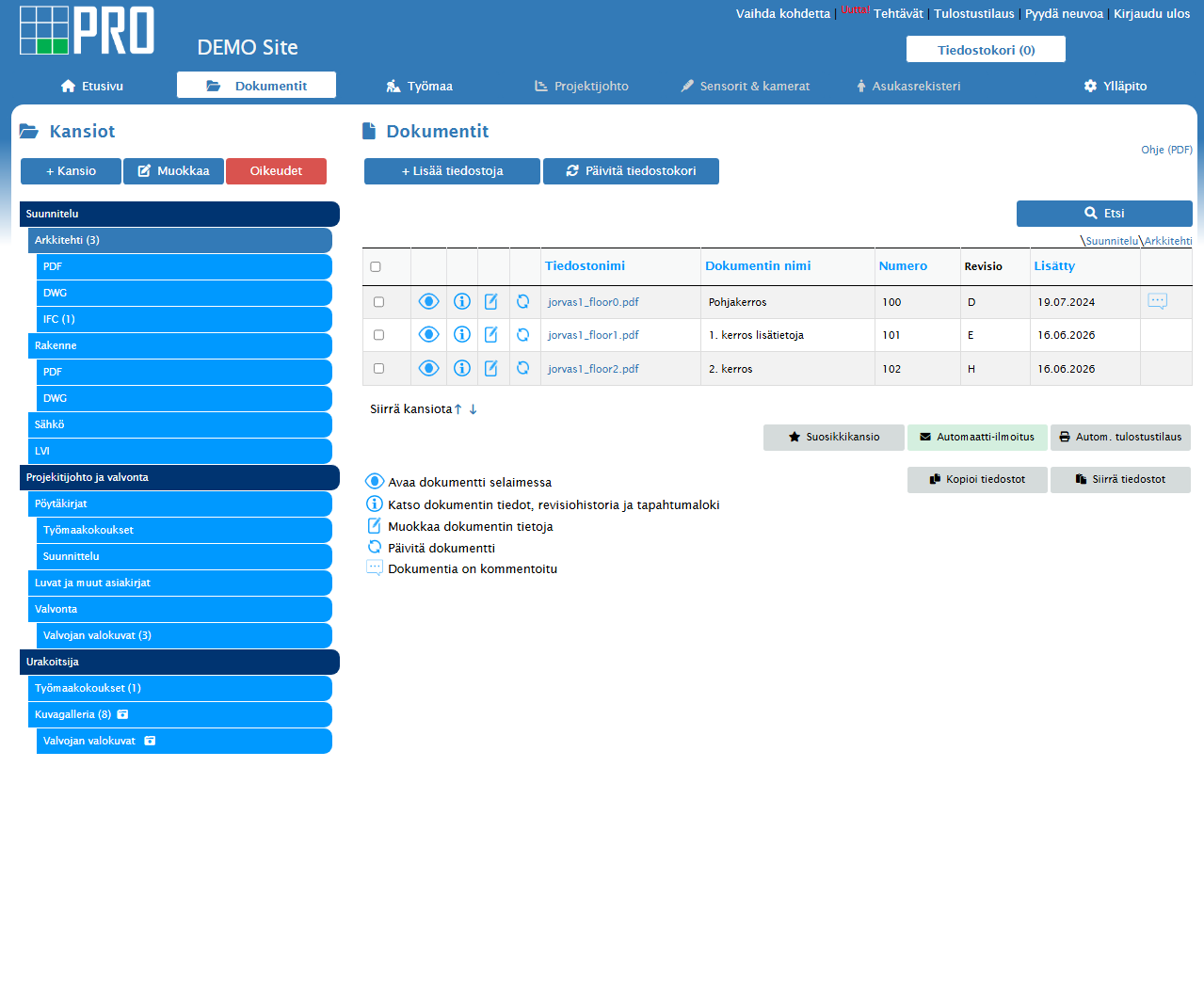 When observations, documents and tasks are in one system, information can be linked to the right location and person responsible.
Mistake 9
Compiling handover documentation is left until the end
Operating and maintenance instructions, inspection records, measurement reports, product information, as-built drawings and other handover documents are often collected only in the final weeks. Materials then have to be found across several systems, with missing documents requested in a rush.
What are the consequences?
- Missing materials delay handover.
- There is insufficient time to check document accuracy.
- Responsibility for missing documents is unclear.
- Incomplete information is passed to the maintenance team.
How to prevent it
Define the handover documentation structure, requirements and responsibilities at the start of the project. Track its collection throughout the project and check for gaps regularly, rather than waiting until the acceptance stage.
Mistake 10
Shared information management practices are not agreed or managed
Even the best system cannot solve problems if everyone uses it differently. Information management requires agreed rules, training, named responsibilities and continuous monitoring.
What are the consequences?
- Documents are saved in the wrong places.
- Metadata and naming guidelines are not followed.
- Some project team members continue using old tools.
- The system does not provide a reliable overall view of the project.
How to prevent it
Create practical project information management guidelines and appoint an owner. Train users, monitor compliance with agreed practices and correct deviations quickly. Keep the guidelines concise, practical and easy to find.
Technology supports working practices, but cannot replace them.
Successful information management combines a system, shared rules, clear responsibilities and day-to-day management.
Overview
Mistakes, consequences and solutions
| Mistake |
Typical consequence |
Solution |
| Information is scattered |
Finding the right information takes longer |
One shared project bank |
| Outdated versions in use |
Incorrect work and rework |
Controlled version management and distribution |
| Naming conventions are missing |
Documents cannot be found |
Shared naming conventions and metadata |
| Unclear access permissions |
Security risks or slower work |
Role- and group-based permissions |
| Email attachments |
Multiple file copies |
Share a link to the shared document |
| Decisions are not documented |
Different interpretations and disputes |
Structured decision and approval history |
| Missing responsibilities |
Open issues are left unresolved |
Named owner, deadline and tracking |
| Observations recorded late |
Incomplete quality and site documentation |
Mobile recording directly on site |
| Handover materials collected at the end |
Time pressure, gaps and delays |
Continuous collection and monitoring |
| Shared practices are not managed |
Information in the system is unreliable |
Guidelines, training and an accountable owner |
A practical approach
How to prevent information management mistakes
Effective information management does not require a complicated model. It requires clear basic principles introduced at the start of the project and followed throughout its lifecycle.
Choose one official source of information
Make the project bank the place where approved information can always be found.
Agree on structure and naming
Define folders, metadata, document types and naming guidelines.
Define roles and responsibilities
Appoint information owners, approvers and system administrators.
Train everyone involved
Make sure external users also understand the shared practices.
Monitor quality continuously
Check regularly for missing information, outdated versions and open tasks.
Prepare for handover from the start
Compile the final materials during the project, rather than waiting until it ends.
Frequently asked questions
Questions about construction project information management
What is the most common information management mistake in a construction project?
The most common problem is information being scattered across multiple locations. When documents, decisions and tasks are in different systems, finding correct, up-to-date information becomes harder.
How can the use of outdated drawings be prevented?
Use centralised version control where the current version is clearly identifiable and previous versions are retained only in the history. Share document links instead of email attachments.
Is a shared drive enough for construction project information management?
A shared drive may be enough for limited internal file sharing, but a construction project involving several organisations generally needs more detailed version control, access permissions, activity history and task tracking.
When should information management practices be agreed?
As early as possible, ideally before design work and document production begin. Introducing them late creates unnecessary document migration and cleanup work.
Who is responsible for information management in a construction project?
Responsibilities should be defined for each project. There should be a clear overall owner, while each participant remains responsible for the accuracy of their own documents, tasks and information.
How does a project bank reduce information management mistakes?
A project bank brings documents, versions, permissions, tasks, inspections and activity history together in one managed environment. It supports shared, traceable practices, although it cannot solve every problem on its own.