SharePoint and a project bank may look similar at first: both can store files, share information, manage users and display document versions. However, they start from different foundations.
What is the main difference between SharePoint and a project bank?
SharePoint is a general-purpose content and collaboration platform within the Microsoft 365 ecosystem. It can be used to build intranets, team sites, document libraries, lists, forms and organisation-specific workflows. Its strengths are extensive customisation and connections to other Microsoft services.
A project bank is designed for project-based work, particularly construction and infrastructure projects. Its starting point is a shared project involving several companies, handling drawings, plans, meeting minutes, inspections, photos, tasks and handover documentation.
The core distinction
SharePoint provides the building blocks for your own solution. A project bank provides a ready-made construction project workflow and tools.
Drawings, plans and versions
Document management and version control
SharePoint includes versatile document libraries, metadata, version history, approval settings and the ability to restore previous versions. With good planning, it can serve as an effective document management platform.
Construction projects need more than file storage. The system must support a shared folder structure, design disciplines, document statuses, distribution, revisions, naming conventions and large drawing collections. In a project bank, these needs are generally addressed by the service and its setup process.
- The current document version is easy to identify.
- Previous versions and change history remain traceable.
- Documents can be found using folders and metadata.
- Distribution can be targeted to the right project participants.
- Shared project naming and storage practices can be standardised.
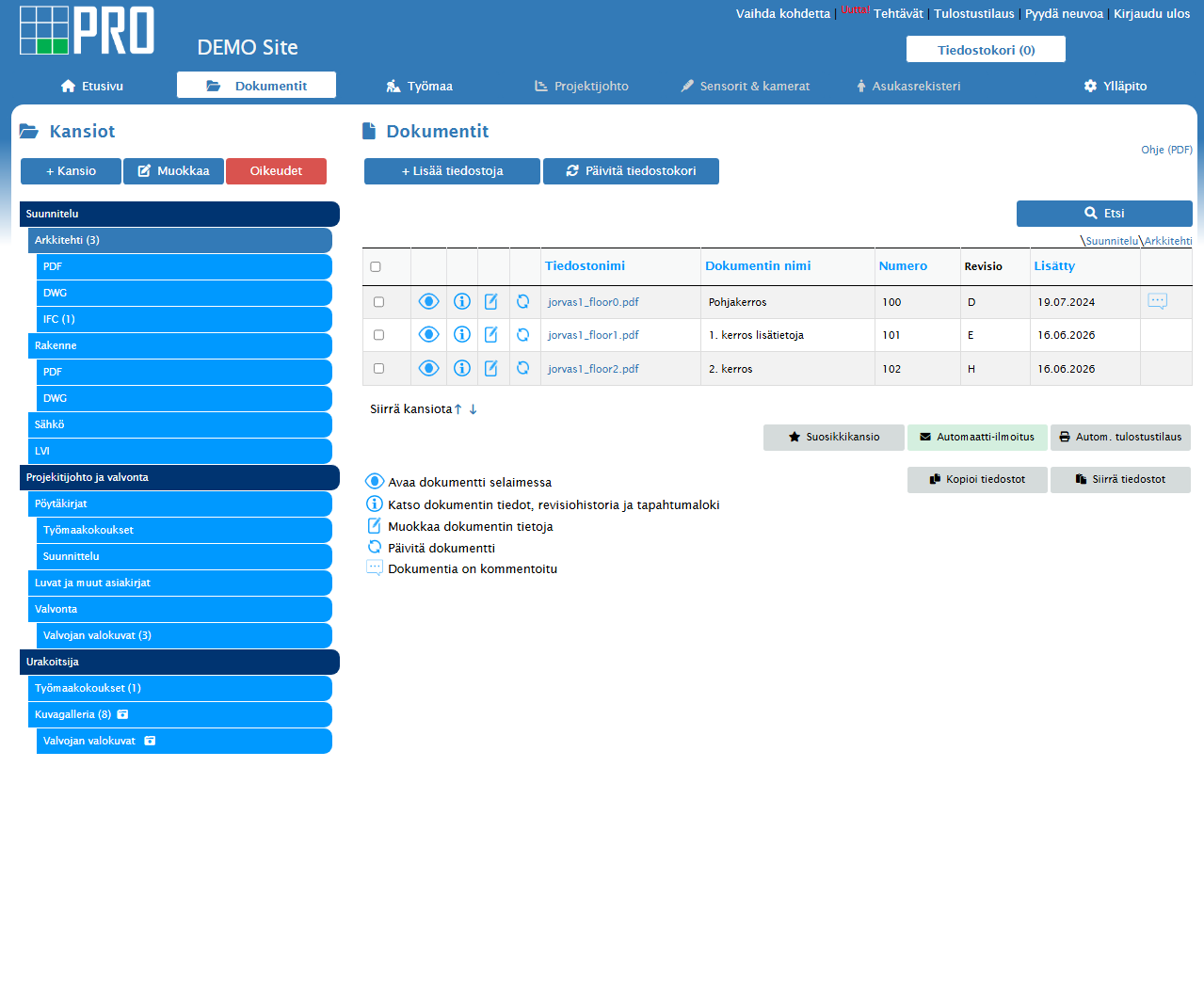 In a project bank, document structure, versions and search are designed around project participants’ needs.
Collaboration across organisations
Access permissions and external users
SharePoint permissions can be set for sites, libraries, folders and individual items. External sharing is also possible, but the practices depend on the Microsoft 365 environment’s administration settings, security policies and user management.
A construction project may involve a client, construction management consultant, design firms, main contractor, subcontractors, supervisors and other stakeholders. A project bank’s access model is typically designed for this: users are managed by project, organisation, role, folder or function.
01
SharePoint
A good fit when most users belong to the same Microsoft 365 environment and the organisation has its own administration resources.
02
Project bank
A good fit when a project involves many external companies, changing users and roles that require carefully defined access.
Beyond files
Ready-made construction features
SharePoint can be extended with Microsoft Lists, Teams, Power Automate, Power Apps and organisation-specific applications to create task lists, approval processes and reporting, for example.
Extensibility is a strength, but it also involves design, implementation, testing, documentation and ongoing maintenance. A project bank brings essential construction project tools together in one service.
A
Site diaries
Document daily activities, conditions and site status.
B
Inspections
Quality, safety and handover inspections using consistent forms.
C
Defects and tasks
Track responsibilities, deadlines, photos and sign-offs together.
D
Meetings and decisions
Meeting minutes, open issues and decision history linked to the project.
E
Mobile access
Documents, observations and photos available on site, too.
F
Handover documentation
Compile the final project documentation in an organised way for handover.
Speed and control
Setup and ongoing maintenance
Setting up a SharePoint solution typically starts with planning the site structure, document libraries, metadata, permissions and governance model. Any construction-specific workflows must also be implemented and adapted to the organisation’s Microsoft 365 environment.
Setting up a project bank usually focuses on project practices: folder structure, participants, permission groups, naming, document distribution and site processes. Attention can be directed to agreeing how the project will work together.
SharePoint: design the solution
Define sites, libraries, metadata, integrations and governance.
SharePoint: implement and test
Build the required workflows and verify access for external users.
Project bank: configure the project
Set up the project, structure, participants, roles and shared practices.
Project bank: start working
Train users and transfer the initial documents into the shared workspace.
Beyond the licence
Total costs matter
SharePoint may be included in an organisation’s existing Microsoft 365 licence, making it an attractive starting point. The licence price does not represent the full cost, however. Planning, configuration, any consultancy, application development, user support, maintenance and change management must also be included.
A project bank’s costs are usually more clearly reflected in the service price. In return, the platform, updates, construction features and often setup support form part of the same package. When comparing costs, consider project duration, user numbers, external participants and the extent of customisation required.
Look beyond licence costs
Also compare the time spent on development, maintenance, user administration, training and manual work over the entire project lifecycle.
Overview
Comparing SharePoint and a project bank
| Comparison point |
SharePoint |
Construction project bank |
| Main purpose |
General content and collaboration platform |
Shared workspace for construction and infrastructure projects |
| Setup |
Requires solution design and configuration |
Ready-made foundation with project-specific configuration |
| Document version history |
Versatile and configurable |
Preconfigured for project use |
| External users |
Permitted according to the organisation’s sharing policies |
Central to project collaboration across companies |
| Construction metadata |
Must be built or configured separately |
Typically available or quick to configure |
| Site diaries and inspections |
Require separate implementation or applications |
Often included on the same platform |
| Customisation |
Very extensive |
Controlled and focused on industry use cases |
| Microsoft 365 integration |
Very strong |
Depends on the service’s integrations |
| Ongoing maintenance |
The organisation’s or partner’s responsibility |
Mainly the service provider’s responsibility |
| Best use case |
Broad internal collaboration and bespoke organisational solutions |
Construction projects involving multiple parties that need to start quickly |
Selection criteria
Which should you choose?
SharePoint may be the right choice when
- the organisation already has strong Microsoft 365 governance and expertise
- the solution is used mainly within the organisation
- extensive customisation and Microsoft integrations are needed
- the organisation can manage development, support and ongoing maintenance
A project bank may be the right choice when
- the project needs to start quickly without building a bespoke system
- several companies, roles and changing external users are involved
- construction-specific document, site and quality management features are needed
- one service is wanted for documents, tasks, inspections and reporting
The solutions can also complement each other. SharePoint can support internal company information management, while a project bank serves as the project’s official shared workspace for the client, designers, contractors and supervisors.
Frequently asked questions
Questions about SharePoint and project banks
Can SharePoint be used as a project bank?
Yes. SharePoint can be configured with document libraries, metadata, permissions and workflows similar to those of a project bank. A complete construction solution usually requires planning, configuration and ongoing maintenance.
Does SharePoint have version control?
Yes. SharePoint document libraries support version history and restoring previous versions. Settings and retention limits depend on the organisation’s and site’s configuration.
Can external contractors be invited to SharePoint?
Yes, if external sharing is enabled and configured in the organisation’s Microsoft 365 environment. User management practices should be planned before the project starts.
Is a project bank only for storing documents?
No. Alongside document management, a construction project bank may include tasks, site diaries, inspections, defect lists, meetings, photos and reporting.
Can SharePoint and a project bank be used together?
Yes. SharePoint can serve as the company’s internal collaboration platform, while a project bank provides a shared, managed source of information for everyone involved in the project.